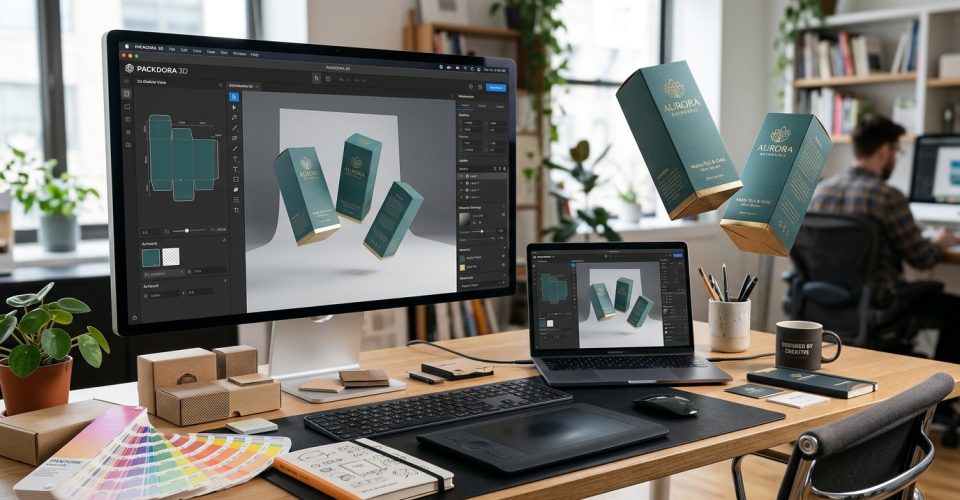
You might have the brand vibe, the copy, and even the artwork, but turning that into something a customer (or investor) can see and a printer can produce is the hard part. You need a dieline that’s structurally correct, a realistic 3D preview, and visuals strong enough for listings, ads, and presentations.
That’s exactly the gap Pacdora aims to fill: an online platform built around 3D mockups + dieline templates + helpful design tools, you can prototype packaging quickly, iterate with confidence, and move to print with fewer surprises.
Realistic 3D mockups What is Pacdora (and why packaging teams use it)?
Pacdora is a packaging designing tool. It streamlines the process of creating a wonderful packaging box guarantee, from selection to creation of a great design. Thanks to the built- in features of pacdora; it has unlimited built-in templates and editing features. Within a very small fraction of time, pachodora has become the essential tool in the designing department of every packaging industry.
A Brief Overview Of Pacdora: See its purpose of creation!
This tool has been created to simplify and modernize the art of packaging. It’s helped us foresee how a packaging design would look in your brand colors. It gives you confidence in your selection and helps brand trust with the visualization that is better than any experts. This one tool is equally beneficial for designers, barns owners, and manufacturers. Creating inspiration through your creative design and seeing how people would see it, has created Pacfora, a tool that’s credible enough to rely on.
Pacdora positions itself as a hub for mockups and dieline templates, where you can pick a packaging structure, customize dimensions, preview designs in 3D, and export assets for marketing or production. Pacdora also highlights broad adoption (“Loved by 4 million+ Pacdora users”) on its site.
Print and packaging companies talk about it a bit differently: as a way to speed up approvals and help customers visualize packaging before ordering. We, Pack Role, use Pacdora internally to support customers and reduce friction around mockups and dielines.
Purpose of creation!
Pacdora is created to see the magic in thoughtful designs. When you don’t know how to share your vision about a box, here pacdora finds its place. Pacdora was developed to address the several long standard challenges in meaningful design creation!
- Dependence of packaging experts on 2 D dielines that is hard to communicate and leads to misconceptions.
- Too long prototyping process, resulting in delayed manufacturing process.
- Inefficient collaborations between designers, marketers, and manufacturers.
- Technical boundaries that made professional packaging designs inaccessible to non-technical persons.
All is said and done, Pacdora is launched to bridge a gap between design creativity and manufacturing reality. Saving time, money and resources is one of the core purposes to create.
It’s a way to move faster towards your custom packaging creation journey. Did you think what’s the difference between generic packaging and custom packaging see our latest post: Generic Packaging vs Custom Packaging to use in Businesses- Which is the best?
Pacdora: Real-Time 3D Modelling Software & 3D Mockup Tool
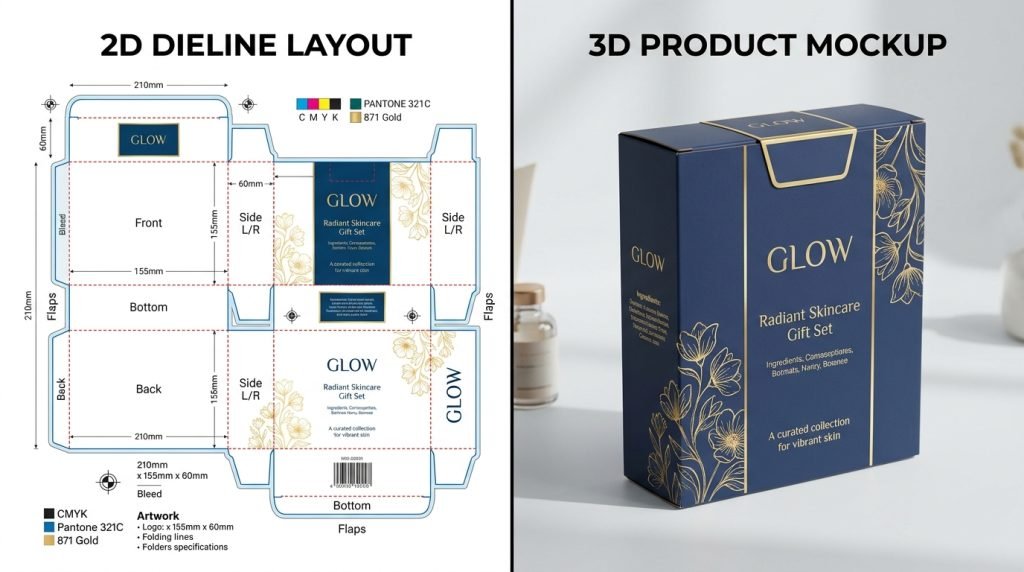
A strong mockup isn’t just pretty—it’s a decision-making tool. The moment you can rotate the pack, see lighting and shadows, and confirm how artwork wraps around edges, feedback becomes clearer and revisions get faster.
Pacdora’s mockup library is built for that workflow: choose a mockup, upload artwork, adjust details, and preview everything in real-time 3D—then export visuals as images or video (without needing PSD-based mockup files).
Do I need advanced design skills to use it?
Not necessarily. Pacdora frames several of its tools as beginner-friendly, with ready-made mockups and step-by-step creation (choose a mockup → upload artwork → customize → export).
How many mockups are available?
You’ll see two common numbers depending on where you look:
- Pacdora promotes 7,000+ mockups on its mockups page.
- Its pricing comparison table references 5,000+ mockups as part of plan features.
Either way, the positioning is clear: it’s meant to be a large library you can search instead of building scenes from scratch.
Dielines, templates, and structure—so it’s not “just a render”
Mockups sell the vision. Dielines make it real. If your dieline is off—wrong flaps, wrong tolerances, wrong panel sizes—you lose time and money when it reaches production.
Pacdora leans heavily into structural templates, offering 3,000+ box templates and the ability to customize dimensions, material, and paper thickness, then download in AI, PDF, or DXF (plus JPG/PNG previews depending on the template/tool).
What file formats can I download for dielines?
Pacdora repeatedly mentions exporting dielines in AI, PDF, or DXF from its dieline generator and template pages.
Why do dielines often have different colored lines?
In professional packaging workflows, dielines commonly use different colors to represent instructions for cutting/creasing/bleed. PakFactory explains that dielines feature multiple colored lines that correspond to die-cutting instructions.
Some packaging blogs also claim Pacdora outputs similarly color-coded guidance (e.g., red/blue/green for crease/trim/bleed), but treat that as third-party commentary unless you confirm it in your own exports.
AI backgrounds that turn “a flat render” into a product photo vibe
Even the best mockup can look unfinished if it’s floating on a blank canvas. This is where Pacdora’s AI background generator is useful: you upload a product image, pick from recommended styles/scenes, and export a more “studio-like” result. Pacdora says the tool removes the background and uses rendering logic to match angle, lighting, and shadow so the composite looks more realistic.
Why would a brand use an AI background generator?
Because it replaces a lot of expensive “test shooting.” Pacdora explicitly positions this as a way to explore scenarios quickly without the cost/time of traditional photoshoots.
Barcode + QR tools for packaging-ready assets
Packaging isn’t complete without functional elements—QR codes for campaigns, barcodes for retail, inventory labels, shipping, and compliance needs.
Pacdora offers a QR code generator that converts text/URLs into QR codes and exports PNG/JPG/SVG.
Its barcode generator pages position the tool for labeling, inventory management, shipping, and more, with downloads in common image/vector formats.
Should QR codes and barcodes be vector?
If you’re sending to print, SVG is often the safest bet (scales cleanly). Pacdora’s QR generator explicitly supports SVG exports.
From design to print: Pacdora’s printing services (when you want production, not just previews)
If your goal is to go beyond mockups, Pacdora also promotes printing services—including low minimum orders (it states a minimum order quantity of five items) and eco-minded materials/inks.
Can I order printed packaging directly?
Pacdora says yes for certain products (e.g., custom printed cardboard boxes), including on-demand printing with minimum order quantities and worldwide shipping claims.
(If you’re a print shop, you may still prefer to use Pacdora for visualization + dielines and keep production in-house—depends on your business model.)
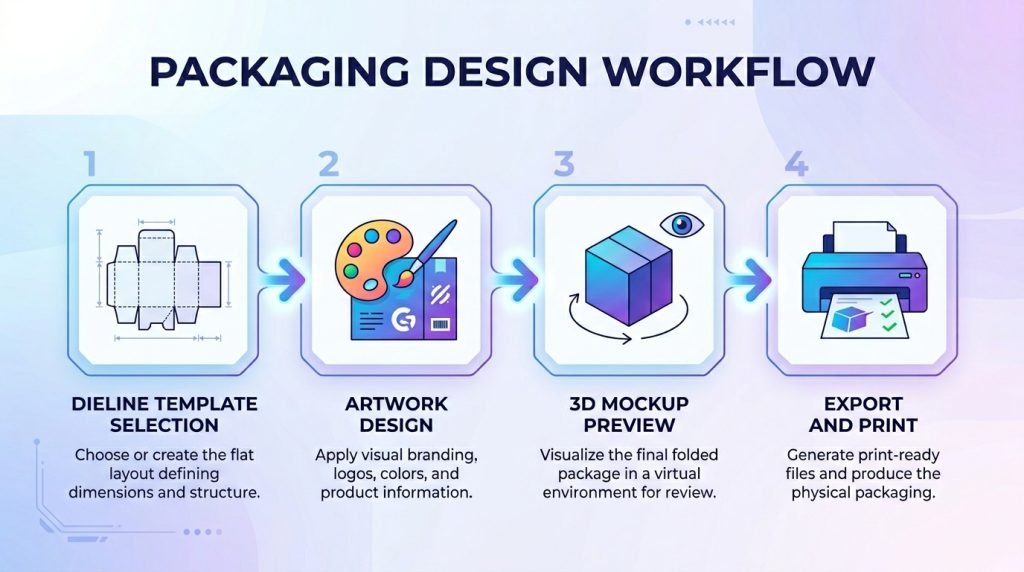
A practical Pacdora workflow that actually matches real packaging projects
Here’s a simple end-to-end process that mirrors how packaging typically gets approved:
1) Start with structure (don’t start with artwork)
Pick a dieline template close to your box style and product needs. Pacdora’s dieline generator flow is essentially: choose a template → enter dimensions/thickness/material → download AI/PDF/DXF.
2) Build the design around the panels
Once you have the structure, you can design artwork to match the panels and folds. If you work in Illustrator or similar tools, AI/PDF dielines are a standard handoff format.
3) Preview in 3D (this is where you catch expensive mistakes)
Use a matching mockup, upload the artwork, and rotate/zoom to check:
- front-panel hierarchy (brand name, product name, claims)
- side-panel readability
- seam/fold collisions with key elements
- label wrap alignment and edge margins
Pacdora’s mockup tool emphasizes real-time 3D updates and exportable visuals.
4) Export visuals for approvals and marketing
For stakeholder approvals, export clean images (and sometimes a rotating video if it helps non-designers “get it”). Pacdora highlights exporting HD images and MP4 videos, and its pricing table references higher-res exports (4K/8K) depending on plan.
If you run a print website: Pacdora’s Editor SDK / API angle
This is where Pacdora becomes more than a design tool, it becomes part of a web-to-print funnel.
On its enterprise page, Pacdora describes adding an editor to your site so customers can customize products with real-time 3D previews, instant pricing, and production-ready exports, without building everything from scratch.
Does Pacdora generate production-ready files?
Pacdora explicitly says exported files are print-ready and mentions support for dieline outlines, bleed areas, and CMYK color profiles for professional print standards (in the enterprise context).
Can customers design on mobile?
Pacdora notes that editing isn’t currently supported on mobile devices (though customers can view live 3D previews on mobile).
How Pacdora compares to other packaging design approaches
No single tool is perfect for every workflow. The difference is usually what you’re optimizing for.
Pacdora vs structural CAD tools (e.g., Esko ArtiosCAD)
ArtiosCAD is positioned as a professional structural packaging CAD solution for structural design, development, and virtual prototyping—often used in enterprise packaging engineering workflows.
Pacdora is more “template + fast preview” oriented, which can be ideal for marketing teams, e-commerce brands, and print sales flows.
Pacdora vs desktop 3D mockup tools (e.g., Boxshot)
Boxshot is a dedicated 3D packaging mockup application with customizable shapes and a traditional software licensing model.
Pacdora’s core appeal is browser-based speed + library depth + packaging-first templates.
Pacdora vs Adobe Dimension
Adobe Dimension is positioned for creating 3D mockups and brand visualizations, particularly for designers already in the Adobe ecosystem.
Pacdora tends to emphasize packaging structures, dielines, and web-to-print use cases more directly.
The bottom line: when Pacdora makes the biggest difference
Pacdora shines when you need to:
- prototype packaging quickly (structure + visuals)
- reduce back-and-forth approvals with realistic 3D previews
- produce marketing-ready assets without complex mockup files
- move toward print with downloadable dielines (and even optional printing services)
- support web-to-print with an embeddable editor experience
If your workflow is deeply engineering-driven (custom structures, tooling constraints, advanced CAD needs), you may still rely on enterprise CAD tools. But for a huge range of brand, e-commerce, startup, and print-sales scenarios, Pacdora can be a practical “bridge” between idea, visualization, and production.
Therefore, if you are looking for custom jewelry boxes like bracket boxes, necklace boxes, or rigid boxes for any other product of your choice, you must start crafting custom designs using Pacdora. After creating the design, measure the weight of the product and dimensions to give it a real touch.
For measuring the right weight, dimensions, and even cost see these relevant posts: How to Measure Your Product Dimensions for a Perfect Box? How Much Does Packaging Cost?